


Restaurant365
4.7590.00 Reviews
App Specs
- Version
- 11.7.3(7942)
- Updated On
- License
- Free
- Downloads
- 100,000+
- Developer
- Restaurant365
- Categories
- Business
- Platform
- Android
Screenshots
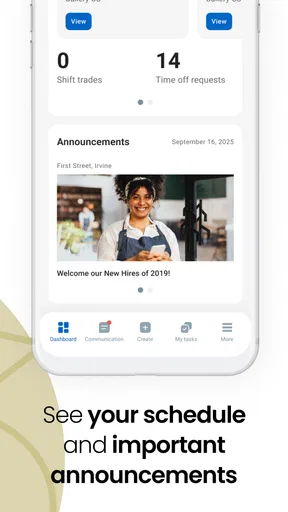
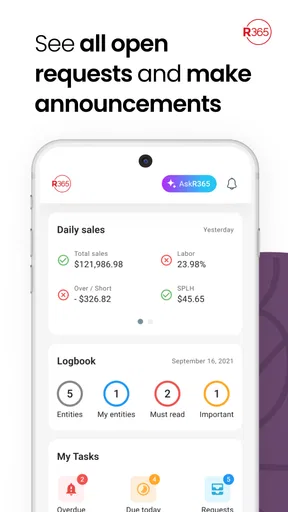
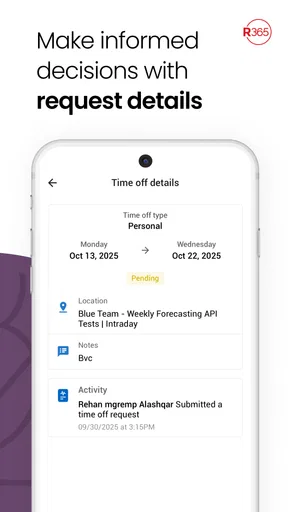
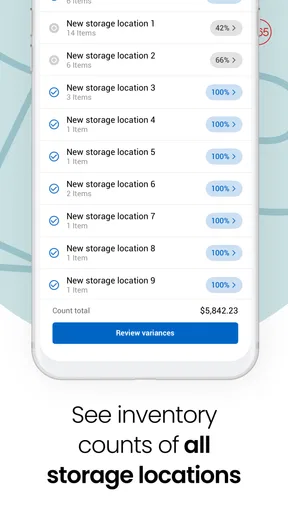
 Analysis by AppCompare
Restaurant365 is the kind of business app I would judge less by its visual polish and more by how calmly it handles a busy restaurant day. Restaurant managers and operators rarely open a tool like this while sitting comfortably at a desk; they use it between deliveries, staff questions, inventory checks, and the rush of service. My experience with Restaurant365 is that its real value depends on fitting into that pace without creating another source of confusion.
Developed by Restaurant365, this free business app is aimed at people who already work within the Restaurant365 environment and need a mobile way to stay connected to their restaurant operations. It is available for Everyone, runs on Android devices using version 8.0 or later, and has built a sizeable audience, with over 100 thousand installs and a 4.7 average from around 10 thousand ratings. Those figures suggest a mature, well-received tool, but they do not remove the practical questions that matter most: can you get signed in quickly, can you recover when something appears missing, and does mobile access genuinely save time?
Where people usually get stuck before the app becomes useful
The first point of friction is often expectation. A restaurant operations app is not automatically a complete replacement for every desktop task, nor is it a general-purpose point-of-sale app simply because it belongs to the restaurant technology space. Restaurant365 works best when it is treated as a mobile companion to an existing business setup rather than as a standalone tool that can be installed and understood without context.
That distinction matters for a new user. After installing it, I would not begin by tapping through every available area at random. I would first establish which restaurant, company account, and daily responsibility the login is meant to serve. A manager checking labor information needs a different starting point from someone reviewing purchasing or financial activity. If the wrong location or role is selected, the app can appear incomplete even when the account itself is functioning correctly.
Another common stumbling block is confusing an empty screen with a failed connection. Restaurant information is usually dependent on the account configuration and the data available to that business. If a section has no current entries, the cause may be a date filter, a location selection, a role restriction, or simply the fact that the relevant information has not been entered yet. I find it safer to check those basics before repeatedly closing and reopening the app.
There is also a human factor. Restaurant teams often share devices, use several locations, or hand responsibilities from one manager to another. That makes account identity especially important. Before troubleshooting anything technical, I would confirm that the person using the phone is signed in with the intended business credentials and has the correct access. A quick check here can prevent a long, unnecessary support conversation.
What I would check during the first setup
I would install the app on a supported Android device, open it when the phone has a reliable connection, and allow the initial screens to load fully rather than immediately switching between apps. The current release is 11.7.3(7942), so keeping the installation current is sensible when a team reports behavior that another colleague cannot reproduce. Different devices can also behave differently, especially when one has an older operating system or aggressive background restrictions.
Worth Reading Before You Choose

EA SPORTS FC Mobile 26 Is a Bigger Football Game, but It Takes Time

Flipboard Shows What News Apps Must Do Beyond the Feed

Switching to Android Auto Means Rethinking Your Driving Routine

Google Calendar Makes a Crowded Week Easier to Manage

Ludo King Makes the Most of the Minutes Between Plans

Baby Panda World Brings Quick Play to Modern Phones, but Its Game Library Feels Busy
Next, I would verify the account and location context before judging the interface. If a restaurant group operates more than one site, a manager should pay attention to which location is active whenever reviewing information or taking an action. This is one of the most important practical habits with a multi-location business tool: confirm the operating context before acting on the numbers.
I would also test the app with one small, familiar task instead of trying to validate the whole system at once. For example, open the area the manager uses most often, check whether the expected restaurant appears, and confirm that the information looks current. This creates a useful baseline. If that simple check works, later problems are easier to isolate. If it fails, there is no reason to spend time exploring less familiar sections.
Notifications and background behavior deserve realistic expectations. A phone may delay updates when battery-saving settings restrict an app, when the connection changes between networks, or when the device has been idle for a long period. I would not assume that a delayed screen means Restaurant365 has lost business data. First, I would refresh from a stable connection and compare what the app shows with the information available through the team’s normal Restaurant365 workflow.
For an iPhone user, the decision is slightly different: the product is described as a mobile app, but the device requirements and release details here specifically point to the Android version. I would therefore check the relevant platform’s official availability and compatibility before planning a rollout across a mixed-device team. That is a small administrative step, but it prevents a manager from promising the same setup to everyone before testing it.
A better way to use it during a busy shift
The strongest use case is not sitting down for a long analysis. It is the short operational check that prevents a small issue from becoming a closing-time problem. Imagine a manager moving between the dining room and the back office while a delivery question comes in. Instead of waiting to reach a computer, the manager can use the mobile app as the first place to inspect the relevant Restaurant365 information, then return to the larger workflow if deeper review is needed.
I would organize usage around repeatable moments: before opening, during a handover, after a delivery, and before closing. The point is not to keep the app open all day. It is to make each visit purposeful. A manager can check the information needed for the next decision, record or review what belongs in the current workflow, and then put the phone away. This reduces the temptation to treat mobile access as a substitute for proper reconciliation.
One useful habit is to separate observation from correction. If a figure, item, or status looks unusual, I would first capture the exact context: location, date range, and screen being viewed. Only then would I decide whether the issue needs an edit, a conversation with another team member, or a desktop review. This is more reliable than changing something immediately and later trying to remember what the original value was.
Another practical insight is that the app is likely to be most valuable for people who already understand their restaurant’s process. A new employee may see the screens but not know whether a result is normal, late, duplicated, or incomplete. Training should therefore explain the business workflow first and the taps second. The app can make access faster, but it cannot replace a clear rule about who checks what and when.
Recovering a workflow when something looks wrong
When a page does not load, I would use a simple recovery sequence rather than jumping straight to reinstalling. First, check the connection and wait briefly for the current screen to finish loading. Then return to the previous screen and open the area again. If the problem remains, close and reopen the app, sign in again if necessary, and repeat the same small test that worked during setup.
If the issue affects only one section, I would avoid assuming the whole account is broken. A single missing view may relate to access, filtering, or the data behind that workflow. If every area behaves strangely, the focus should shift toward the account, device, connection, or current app installation. This distinction helps a manager describe the problem clearly instead of reporting only that “the app is not working.”
Before reinstalling, I would make sure there is no unfinished work that depends on the current session and that the team knows what was last completed. Reinstallation can be a reasonable last resort for a damaged local installation, but it should not be the first response to an empty result or a delayed update. The safer order is to verify context, refresh, restart, and then escalate with useful details.
Useful details include the device, operating system, account or location involved, the exact area that failed, and whether another user sees the same behavior. I would also note whether the problem happens on one connection or everywhere. This information turns a vague complaint into a reproducible report and helps separate a local phone issue from a broader account or service problem.
Teams should also agree on a temporary fallback. If a manager cannot confirm an important operational detail through the phone, the answer should not be to guess. The manager can use the established desktop process or ask the responsible colleague to verify it. Mobile convenience is valuable, but restaurant decisions still need a dependable source of truth.
When the phone is not the real cause
Some apparent app failures are actually process failures. If two employees enter information differently, the mobile screen may faithfully display inconsistent records. If a delivery has not been processed in the normal workflow, the app cannot show a result that does not yet exist. If the wrong restaurant is selected, accurate information can look irrelevant. In each case, reinstalling the app would miss the real problem.
Timing can create the same illusion. A manager may expect a change to appear instantly after another person updates the business system, while the information is still being reviewed or has not finished moving through the normal process. I would confirm when the change was made, who made it, and which location or date it concerned before treating the delay as a technical defect.
Access is another important boundary. A colleague might be able to view a section that another colleague cannot, not because one phone is malfunctioning but because their responsibilities differ. That is why comparing users is useful only when their accounts and roles are genuinely comparable. A successful screen on one device does not automatically prove that every user should see the same thing.
The app is also not the best choice for every kind of work. If I needed a long review, detailed reconciliation, extensive data entry, or a broad comparison across many periods, I would prefer the larger Restaurant365 workflow on a computer when available. A phone is excellent for short checks and decisions made away from a desk; it is less comfortable for sustained analysis. Trying to force a mobile screen into a desktop job can create errors and fatigue.
Likewise, a very small restaurant that only needs basic notes, simple scheduling, or a lightweight standalone record may find a full restaurant operations platform more involved than necessary. Restaurant365 makes the most sense for teams that benefit from a connected business process and need mobile access within that environment. Someone looking for a generic checklist or a simple personal expense tracker should look elsewhere.
How it compares with familiar alternatives
Compared with paper binders and scattered spreadsheets, the appeal is obvious: a mobile business tool can make information easier to consult when the manager is not at a desk. It also gives a team a more consistent place to return to than a collection of handwritten notes. The trade-off is that a digital system requires correct accounts, clean processes, and dependable habits. Paper is clumsy, but it rarely produces a login problem.
Compared with a general office app, Restaurant365 is more appropriate when the work is tied to restaurant operations rather than ordinary documents and messages. A spreadsheet may offer more freedom for custom calculations, while a generic notes app may be faster for a one-off reminder. Those alternatives become less attractive when several people need to follow the same restaurant-specific process and preserve a shared operational record.
Compared with using Restaurant365 only on a computer, the mobile app wins on immediacy and loses on screen space. I would use the phone for a quick check during a shift, a handover, or a walk through the operation. I would reserve the computer for work that benefits from a wider view and more deliberate review. The best arrangement is not choosing one forever; it is assigning each device the job it handles well.
Who should install it and who should skip it
I would recommend Restaurant365 to restaurant owners, managers, and team members whose business already uses Restaurant365 and who need access while moving around the operation. It is especially suitable for a manager who regularly leaves the office but still needs to stay connected to the restaurant’s working information. The free price also makes it easy to test within an existing setup without adding a separate purchase decision.
I would be more cautious for anyone expecting the app to explain the restaurant’s processes automatically. It is not a substitute for onboarding, role clarity, or a reliable closing routine. I would also skip it as a first choice if the business does not use Restaurant365 already, if the main need is a basic standalone tool, or if most work involves lengthy analysis better suited to a computer.
The age rating of Everyone is reassuring for general availability, but it should not be confused with universal suitability. The important question is not whether a person can install it; it is whether that person has a legitimate business reason and the right access to use it. Restaurant operators should keep that distinction clear when setting up shared devices or training new staff.
My practical verdict after testing the workflow
Restaurant365 earns its place as a mobile companion when it shortens the distance between a restaurant floor and the information needed to make a decision. Its high 4.7 average and roughly 10 thousand ratings show that many users find it worthwhile, while the 589 written reviews indicate a substantial body of user feedback behind that impression. I see the strongest value in quick, purposeful checks rather than trying to conduct every administrative task on a phone.
The app’s main weakness is not a single missing button; it is the possibility of misunderstanding what a blank, delayed, or restricted screen means. Users who verify their location, account, date range, and role will have a much better experience than users who treat every unexpected result as a software failure. That small discipline is the difference between mobile access that saves time and mobile access that creates more questions.
Restaurant365 has been available since April 17, 2019, and its current Android release, 11.7.3(7942), makes it a reasonable option for teams maintaining supported devices. I would install it when the restaurant already depends on the Restaurant365 ecosystem and needs practical access away from a desk. I would not choose it merely because it is free or because a mobile app sounds convenient.
My recommendation is straightforward: use it as a focused operational window, keep the desktop workflow for deeper work, and build a recovery habit before the first busy shift. If your team can agree on who checks each area, which location is active, and when a result needs verification elsewhere, this app can turn scattered moments during service into useful, informed decisions. If those processes are not in place, the app will expose that confusion rather than solve it.
Pros
- Combines accounting
- scheduling
- inventory
- and payroll tools in one platform.
- Real-time sales and labor data helps managers make faster decisions.
- Supports multi-location restaurant groups with centralized reporting.
- Automates invoice processing and reduces manual bookkeeping tasks.
- Integrates with several popular point-of-sale and payroll systems.
Cons
- Its extensive feature set can feel overwhelming for small restaurant teams.
- Pricing may be difficult to justify for single-location businesses.
- Some advanced tools require additional subscriptions or setup fees.
- Dependence on integrations can cause issues when connected systems change.
- Learning the platform may require training and dedicated administrative time.
FAQs for Restaurant365
What is Restaurant365 used for?
Restaurant365 is a restaurant management and operations platform designed to bring important business processes into one system. It can help with accounting, inventory, purchasing, scheduling, payroll integrations, sales tracking, and financial reporting. Rather than being a consumer app for ordering food, it is mainly intended for restaurant owners, operators, managers, accountants, and multi-location hospitality groups that need centralized business information.
Is Restaurant365 suitable for small restaurants and independent operators?
Restaurant365 can be useful for independent restaurants as well as larger groups, but its value depends on the size and complexity of the operation. A small restaurant may benefit from integrated accounting, inventory control, and reporting, while a larger business can use multi-location tools and centralized oversight. However, new users should evaluate pricing, setup requirements, and whether all available features are necessary for their workflow.
Does Restaurant365 include point-of-sale and payroll services?
Restaurant365 is designed to connect with restaurant point-of-sale systems and payroll providers, helping operators bring sales, labor, and financial information together. Availability can depend on the specific integration, subscription plan, location, and provider being used. It should not automatically be assumed that every POS or payroll function is included directly, so businesses should confirm supported systems and current integration details before subscribing.
Can Restaurant365 be used to manage multiple restaurant locations?
Yes, multi-location management is one of the platform’s key strengths. Restaurant groups can use it to consolidate financial data, compare sales and labor performance, monitor food costs, standardize purchasing, and review reports across locations. Managers may still need to configure permissions and workflows carefully, because the usefulness of centralized reporting depends on accurate data entry, consistent recipes, properly connected systems, and a suitable account structure.
Is Restaurant365 easy to set up and use?
Restaurant365 offers a broad collection of restaurant-specific tools, but the initial setup may require more time than a simple mobile application. Businesses often need to configure locations, vendors, accounting categories, recipes, inventory items, user permissions, and integrations. Once the system is organized, it can make daily reporting and administration more efficient. New users should expect onboarding and training to be important, especially when migrating existing business data.


